

In short: Adobe Acrobat and LynxPDF serve different enterprise priorities. Adobe Acrobat is a natural fit when workflows depend on Adobe services, Microsoft 365, e-signatures, or connected collaboration. LynxPDF is worth evaluating when enterprise IT needs local or self-hosted deployment, offline access, centralized license management, and a one-time licensing option. The decision should be based on representative workflows, governance requirements, and the organization's IT policies.
Choosing between Adobe Acrobat and LynxPDF is not only a feature comparison. Enterprise teams also need to ask where documents are processed, who controls access, whether IT can manage users and deployments, how restricted-network environments are supported, and how licensing costs are planned.
Adobe Acrobat is often evaluated when a business wants a mature PDF workflow connected to Adobe services, Microsoft 365, e-signature processes, and AI-assisted document work. LynxPDF is designed for organizations that want an enterprise PDF editor for Windows and Mac with local or self-hosted operating options and centralized administration.
This comparison focuses on business requirements rather than declaring one universal winner. It separates document capabilities from operating model so teams can evaluate the trade-offs against their own policies and workflows.
Adobe Acrobat vs. LynxPDF at a Glance
The table below summarizes the enterprise decisions that shape the comparison. It is a starting point for evaluation, not a feature-count ranking.
| Enterprise requirement | Adobe Acrobat | LynxPDF |
|---|---|---|
| Document editing and OCR | Editing, OCR, conversion, and signing workflows | Editing, OCR, conversion, batch processing, and signing |
| Deployment and IT management | Connected desktop and service model | Windows and Mac apps, with offline and self-hosted options |
| User administration | Business and enterprise administration | Admin Console and SSO |
| Collaboration | Connected sharing and collaboration services | Desktop workflows plus LynxPDF Web |
| Enterprise automation | AI Assistant, PDF Actions, and integrations vary by plan | Batch processing and intelligent data extraction |
| Security and governance | Plan-dependent security, permissions, and compliance controls | Redaction, encryption, passwords, permissions, and digital signatures |
| Licensing | Subscription plans | Subscription options plus permanent desktop versions |
The full feature matrix on LynxPDF's pricing page is useful when checking individual capabilities. A representative pilot should cover selected plans, identity requirements, deployment, and real documents.
For a broader, multi-product overview, see LynxPDF's guide to Adobe Acrobat alternatives. This article takes a narrower approach by focusing on the business and IT decisions involved in comparing Acrobat with LynxPDF.
Product Positioning: Adobe Acrobat vs. LynxPDF
The two products address overlapping PDF tasks but present different starting points for enterprise adoption.
Adobe Acrobat: Connected PDF Ecosystem
Adobe Acrobat fits organizations that want PDF work connected to a broader document and collaboration ecosystem. Acrobat Pro provides editing, OCR, conversion between PDF and Microsoft Office formats, e-signature workflows, redaction, and password or permission controls.
Adobe is often shortlisted when teams already rely on Microsoft 365, Adobe document services, shared documents, or AI-assisted document work. The selected Acrobat plan and business configuration determine which capabilities and services are included. See Adobe Acrobat for business for the current offering.
LynxPDF: IT-Managed PDF Environment
LynxPDF is designed for organizations that treat PDF software as an IT-managed application. It combines Windows and Mac PDF editing with local, offline, self-hosted, and centrally administered deployment options.
IT teams can use the LynxPDF Admin Console for centralized license management. The product is often shortlisted when controlled deployment, SSO, batch processing, and flexible licensing matter alongside everyday PDF editing.
Browser Access for Mixed Teams
LynxPDF Web adds browser-based account access, document sharing, online editing, and collaborative review. Its capabilities include sharing permissions, annotations, comments, signatures, measurements, an exclusive lock to reduce overwrite conflicts, conversion, OCR, compression, comparison, batch processing, page management, redaction, encryption, digital signatures, and document navigation.
Web access and desktop licensing should be assessed together because they serve different deployment and usage requirements. The broader LynxPDF online tools area can help distinguish browser utilities from a managed enterprise deployment.
Operating Model Comparison
Product positioning describes what each platform is designed to support. The operating model explains where document work happens and how IT manages access, deployment, and ongoing service dependencies.
Adobe Acrobat: Connected Service Model
Acrobat's connected service model fits users who routinely work across Microsoft 365, e-signature workflows, shared documents, and other Adobe services. Before adoption, confirm network access, identity requirements, plan entitlements, and any Adobe-specific integrations that are critical to daily work.
LynxPDF: Controlled Deployment Model
LynxPDF's operating model is relevant when IT policies require local or offline processing, self-hosted deployment, centralized license administration, or a predictable deployment boundary. For distribution planning, teams can assess Microsoft Intune, Group Policy (GPO), and System Center Configuration Manager (SCCM), subject to the selected package and service terms.
Enterprise Insight: Why Deployment Matters
Many enterprise IT teams now assess PDF software as part of a broader endpoint, identity, and data-governance program. The buying question is therefore not only whether a product edits PDFs, but also where documents are processed, how users are provisioned, and what it costs to operate the software over its expected lifecycle.
Enterprise Governance & Business Value
LynxPDF's value for an enterprise rollout extends beyond individual PDF features. The relevant business outcomes are workflow efficiency, compliance support, and controlled distribution.
Efficiency Across PDF Workflows
Windows, Mac, and Web access can help teams use one PDF environment across different work patterns. Batch OCR, conversion, compression, comparison, and document organization can reduce repeated manual steps when users process documents at volume.
Compression is one of several workflows that may affect enterprise PDF operations. For a focused comparison of compression workflows, see LynxPDF vs. Adobe PDF compression features.
Compliance and Data Governance
For sensitive or regulated documents, enterprise IT teams can assess whether self-hosted and offline operation fit their data-governance requirements. Access control through SSO, centralized license administration, permissions, redaction, encryption, and digital signatures are relevant controls, but compliance suitability still depends on the organization's policies and implementation.
LynxPDF's security overview provides context on product security capabilities. Organizations should evaluate these capabilities alongside their own data retention, access control, encryption, and incident response requirements.
Pricing & Total Cost of Ownership (TCO)
Enterprise software decisions are rarely based on the initial license price alone. Teams typically evaluate total cost of ownership (TCO) over several years, considering deployment scale, licensing model, maintenance, upgrades, and technical support. The LynxPDF pricing page includes a switching calculator to help compare long-term licensing costs:
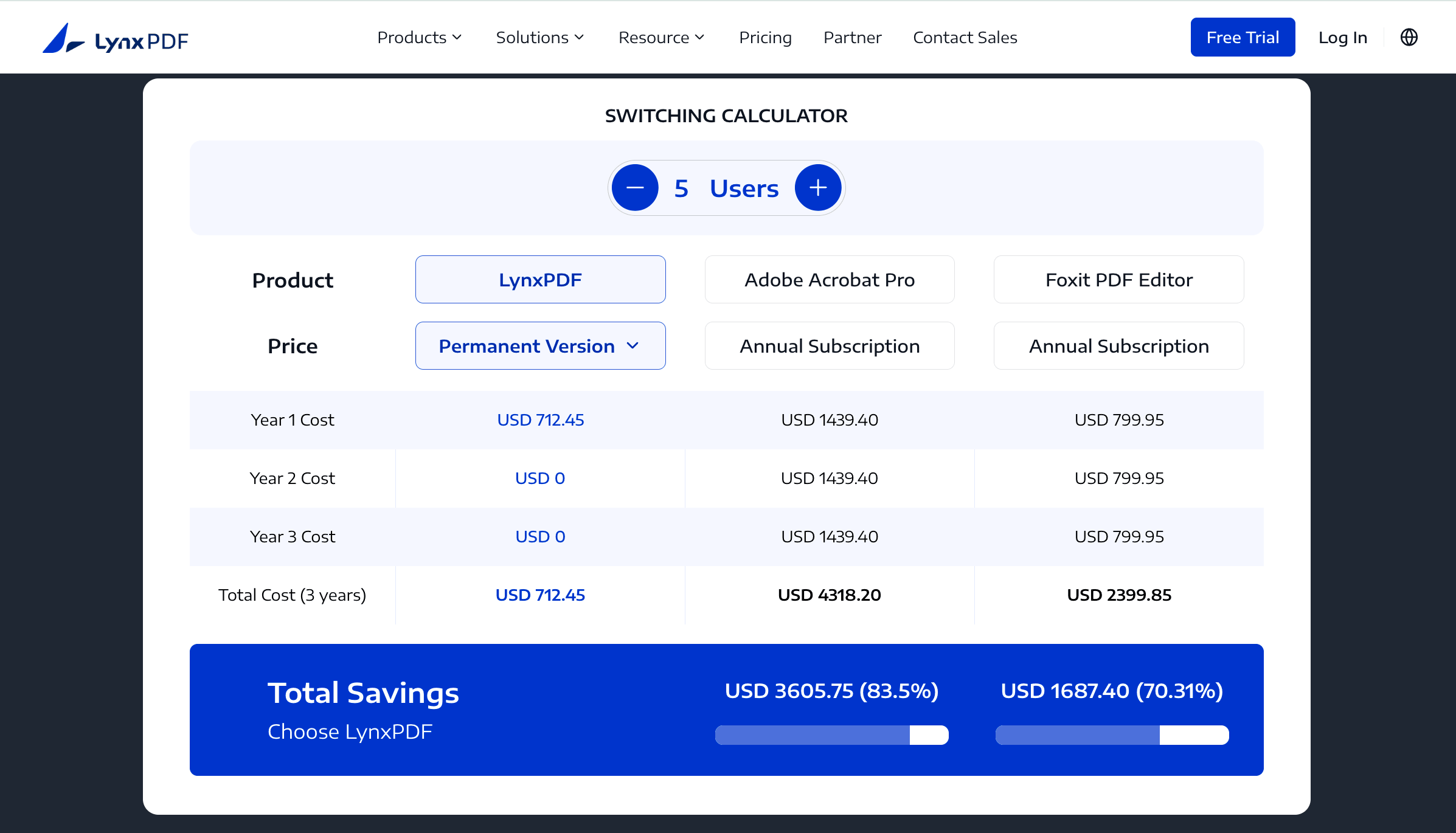
Example pricing shown for illustration only. Actual pricing may vary.
In the five-user example shown, the calculator estimates a three-year cost of USD 712.45 for the LynxPDF permanent license, compared with USD 4,318.20 for an Adobe Acrobat Pro annual subscription. This represents a difference of USD 3,605.75, or approximately 83.5%, in this illustrative scenario.
While a permanent license can help reduce recurring software costs over a longer ownership period, subscription licensing may better suit organizations that prefer predictable annual budgeting or ongoing access to subscription-based services. For larger deployments, LynxPDF also provides volume discounts of up to 50%, helping organizations reduce software costs at scale. Eligibility and final terms depend on user volume and the purchasing agreement. Use the LynxPDF pricing calculator to estimate your organization's costs or contact the LynxPDF sales team for a deployment-specific quote.
Enterprise Use Cases & Pilot Scenarios
The right choice changes with the document workflow. The following scenarios make the difference more concrete.
| Business requirement | More direct option to evaluate |
|---|---|
| Microsoft 365-heavy organization | Adobe Acrobat |
| Adobe ecosystem integrations and Adobe Sign | Adobe Acrobat |
| Standalone PDF signing with controlled deployment | LynxPDF |
| Government or regulated environment with controlled deployment | LynxPDF |
| Offline or restricted-network PDF processing | LynxPDF |
| Distributed teams with mixed desktop and Web access | Evaluate both against identity, data, and workflow requirements |
Choose Adobe Acrobat When Ecosystem Integration Leads
Adobe Acrobat is a practical fit when document work must connect to Adobe services, Microsoft 365, e-signature processes, collaboration, or AI-assisted document tasks. It is also a natural option when users already rely on Adobe's document ecosystem and want to keep PDF work within that environment.
Choose LynxPDF When IT Control Leads
LynxPDF is a practical fit when deployment control, offline operation, self-hosted administration, or centralized license management are primary requirements. It is particularly relevant for teams that need Windows and Mac PDF software but do not want the evaluation to center only on a connected subscription ecosystem.
Evaluate Both for High-Volume PDF Work
A representative pilot is essential when the workflow includes OCR, conversion, redaction, forms, signatures, or batch operations. Measure output quality, user steps, deployment effort, update behavior, and administrator workload rather than relying on feature names alone.
Enterprise Pilot Scenarios
These scenarios are evaluation patterns, not claims about a specific customer deployment. They help enterprise teams turn product differences into measurable pilot requirements.
Government and Regulated Documents
Test whether controlled deployment, offline processing, redaction, encryption, and digital signatures fit the organization's document-handling policies. Compare access administration and audit procedures with the requirements of the relevant public-sector or regulated workflow.
Healthcare Records and Forms
Test scanned-document OCR, searchable output, form handling, redaction, signatures, and internal access controls using representative records. The pilot should confirm how documents are processed and retained under the organization's healthcare privacy policies.
Manufacturing Documents
Test batch conversion, compression, comparison, annotations, and page organization on technical documents and supplier files. Include Windows and Mac users where both platforms are part of the production workflow.
Finance and Legal Workflows
Test permissions, redaction, signatures, comments, document comparison, and administrator controls on contracts, reports, and review packages. Review LynxPDF's published case studies for documented customer examples rather than treating these scenarios as proof of a particular result.
Migration Decision Framework
Switching from Acrobat is a workflow migration, not only a software installation. Before changing platforms, teams should inventory document templates, signatures, forms, integrations, user roles, deployment packages, and support processes.
Decision-makers can structure the migration around four gates:
- Map dependencies: identify Adobe-specific integrations, templates, forms, signatures, and support processes.
- Validate workflow fit: test representative documents for output fidelity, OCR, conversion, signatures, forms, and user steps.
- Model the rollout: confirm identity management, deployment packages, offline or restricted-network requirements, activation, updates, and support ownership.
- Approve the business case: compare the planned years of use, licensing model, deployment effort, update policy, and support scope.
This sequence helps separate a genuine platform fit from a simple application replacement and identifies Adobe-specific dependencies before a broader rollout.
Enterprise Approval Checklist
Before approving a rollout, confirm that the evaluation has produced the evidence and ownership decisions below.
- Record the representative documents and workflow results that support the platform decision.
- Confirm Windows and Mac requirements, deployment packages, identity-provider integration, and administrator ownership.
- Document data-handling, offline, self-hosted, access-control, and support requirements.
- Approve the licensing assumptions, volume-discount eligibility, update policy, and deployment-specific quote.
- Assign owners for rollout, user support, updates, and the migration of Adobe-specific integrations.
Frequently Asked Questions (FAQs)
Is LynxPDF an Adobe Acrobat alternative for enterprises?
Yes. LynxPDF is an alternative for enterprise teams comparing PDF editors for Windows and Mac. Its emphasis is on self-hosted deployment, offline use, SSO, Admin Console management, and one-time licensing options, while Adobe Acrobat emphasizes a broader connected document ecosystem.
Is LynxPDF cheaper than Adobe Acrobat?
There is no universal answer without the organization's user count, ownership period, update requirements, deployment effort, and support needs. LynxPDF offers a one-time purchase option, while Adobe Acrobat uses subscription plans; enterprise teams should compare total cost of ownership using their actual rollout assumptions.
Can businesses migrate from Adobe Acrobat to LynxPDF?
Businesses can evaluate a migration when their workflows are covered by LynxPDF and their priorities include controlled deployment, offline processing, centralized administration, and flexible licensing. A pilot should test document fidelity, signatures, forms, integrations, user access, and administrator processes before migration.
What is the best Adobe Acrobat alternative for enterprises?
There is no single best alternative for every enterprise. LynxPDF is a candidate for organizations that prioritize self-hosted deployment, offline processing, centralized administration, Windows and Mac support, and flexible licensing.
Can LynxPDF replace Adobe Acrobat?
LynxPDF can replace Adobe Acrobat for organizations whose requirements center on PDF editing, OCR, conversion, signatures, controlled deployment, offline workflows, and IT administration. Teams that depend on Adobe-specific services or integrations should test those workflows before switching.
Evaluate LynxPDF for Enterprise Deployment
Review LynxPDF for Windows, LynxPDF for Mac, and the Admin Console before planning an enterprise rollout.
Conclusion
Adobe Acrobat aligns with businesses that want a broad PDF ecosystem with integrations, collaboration, e-signatures, AI-assisted features, and Adobe services. LynxPDF aligns with organizations that prioritize controlled deployment, offline operation, centralized administration, Windows and Mac support, Web collaboration, and flexible licensing options.
The final decision should come from a workflow-based pilot. Evaluate representative documents, deployment requirements, compliance policies, identity management, administrator workload, and the long-term licensing strategy before selecting a platform.

 Admin Console
 Custom Business Stamps
 System Integration
 Digital Signatures


