Browser-based PDF Workspace

LynxPDF for WebPDF Workflows, Secured Online

Manage your PDF workflows online with a unified workspace for creating, editing, reviewing, and managing documents for individuals, teams, and organizations.

Edit PDFs online with powerful tools and secure document protection
Collaborate on documents with connected review and sharing experiences
Work seamlessly across LynxPDF Desktop and Admin Console
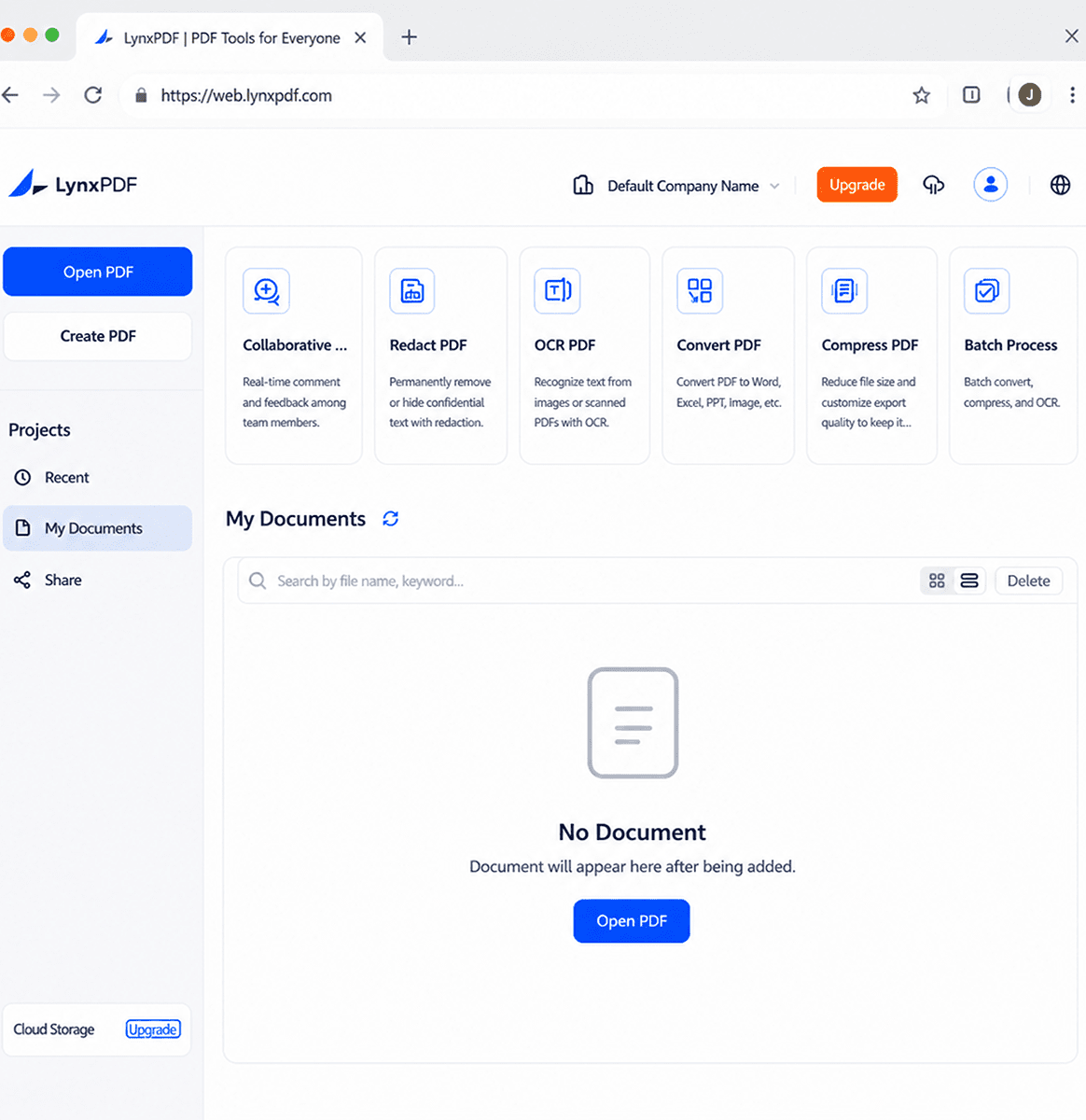
LynxPDF Web workspace preview

Complete PDF Workflows, Available Online

LynxPDF for Web extends PDF access, collaboration, management, and security into a browser workspace built for connected teams.

Access PDFs Anytime, Anywhere

Work across devices with browser access, unified accounts, synchronized entitlements, and streamlined sign-in options.

  • Cross-device browser access
  • Unified account and synchronized entitlements
  • Apple, Microsoft, and Google sign-in

Collaborate on Documents Online

Edit PDF documents directly in the browser with controlled editing, comprehensive annotation tools, and efficient comment management.

  • Online editing with exclusive lock for text, images, and links
  • Annotations including highlights, comments, drawings, shapes, stamps, signatures, and measurements
  • Centralized comment panel for viewing, replying to, editing, and deleting comments

Centralized Document Management

Manage documents with centralized storage, organized file access, and flexible sharing permissions.

  • Upload local files and access Recent, My Documents, and Shared with Me lists
  • Manage files with rename, delete, download, and copy operations
  • Share documents with view, comment, or edit permissions and configurable link expiration

Complete PDF Workflows Online

Edit, manage, and process PDFs online with essential tools in one workspace.

  • Text, image, link, and page editing
  • OCR, conversion, compression, and document comparison
  • Search, thumbnails, and outline navigation

Seamless Updates, Simplified Management

Deliver a consistent browser-based experience with automatic updates and reduced IT management effort.

  • Automatic version updates
  • Reduced IT maintenance effort
  • Consistent feature availability

Enterprise-Grade Security and Compliance

Protect business documents with encryption, permissions, redaction, and digital signatures.

  • Encryption, decryption, and access control
  • Redaction and digital signatures
  • Certificate details and validation

Free Use All 30+ LynxPDF Web Tools

Add annotations and markups, edit text and images, convert to various formats, fill and create forms, organize pages, OCR, compress, protect, sign, and so much more.

Sign Up for Free Trial
Annotate
Edit
Convert PDF
Create Form
Organize Pages
Redact PDF
Encrypt PDF
Compress PDF
Merge PDF
OCR
Document Comparison

One Account. One Platform. One LynxPDF Experience.

Create, edit, collaborate, and manage PDF workflows across desktop, web, and centralized administration with one connected LynxPDF platform.

Windows · Mac

LynxPDF Desktop

Create, edit, and manage PDFs locally with powerful desktop capabilities designed for professional document workflows on Windows and Mac.

  • Create, edit, and annotate PDF documents
  • Advanced PDF tools including conversion, OCR, and document processing
  • Offline access with high-performance local workflows
Free Download
Any browser

LynxPDF for Web

Browser-based PDF workflows for online editing, sharing, collaboration, and document management without local installation.

  • Online editing with exclusive lock
  • Document sharing, annotations, and comments
  • Cloud workspace and centralized document access
Try LynxPDF Web
IT and Admins

Admin Console

Centralized administration for managing users, licenses, and deployment settings across the LynxPDF environment.

  • User and license management
  • Deployment management and visibility
  • Centralized administration controls
Explore Admin Console
Together, LynxPDF Desktop, Web, and Admin Console provide a complete PDF workflow platform that connects document creation, collaboration, and administration across every environment.

LynxPDF Desktop and Web Comparison

Desktop and Web serve different workflow needs. Choose the right experience based on how your team works.

LynxPDFLynxPDF for Web
Value-Added Services
On-Premise Deployment
SSO Integration
Centralized management via Admin Console
Comprehensive installation packages (MSI, EXE, PKG, DMG, etc.)
Flexible deployment options (Intune, GPO, RDS, SCCM, etc.)
Sharing and Collaboration
Manage document's sharing permissions for seamless collaboration (view, comment, and edit)
Enjoy cloud storage to save and share large files with team members
PDF Editorial Suite
Collaborative Annotation
Enterprise-Grade Security
Forms & Digital Signatures

Bring LynxPDF for Web into Your Document Workflow

Start with browser-based PDF editing, sharing, and document management while staying connected to the broader LynxPDF platform.